
5.6 KiB
This model was released on 2021-09-21 and added to Hugging Face Transformers on 2021-10-13.

TrOCR
TrOCR is a text recognition model for both image understanding and text generation. It doesn't require separate models for image processing or character generation. TrOCR is a simple single end-to-end system that uses a transformer to handle visual understanding and text generation.
You can find all the original TrOCR checkpoints under the Microsoft organization.
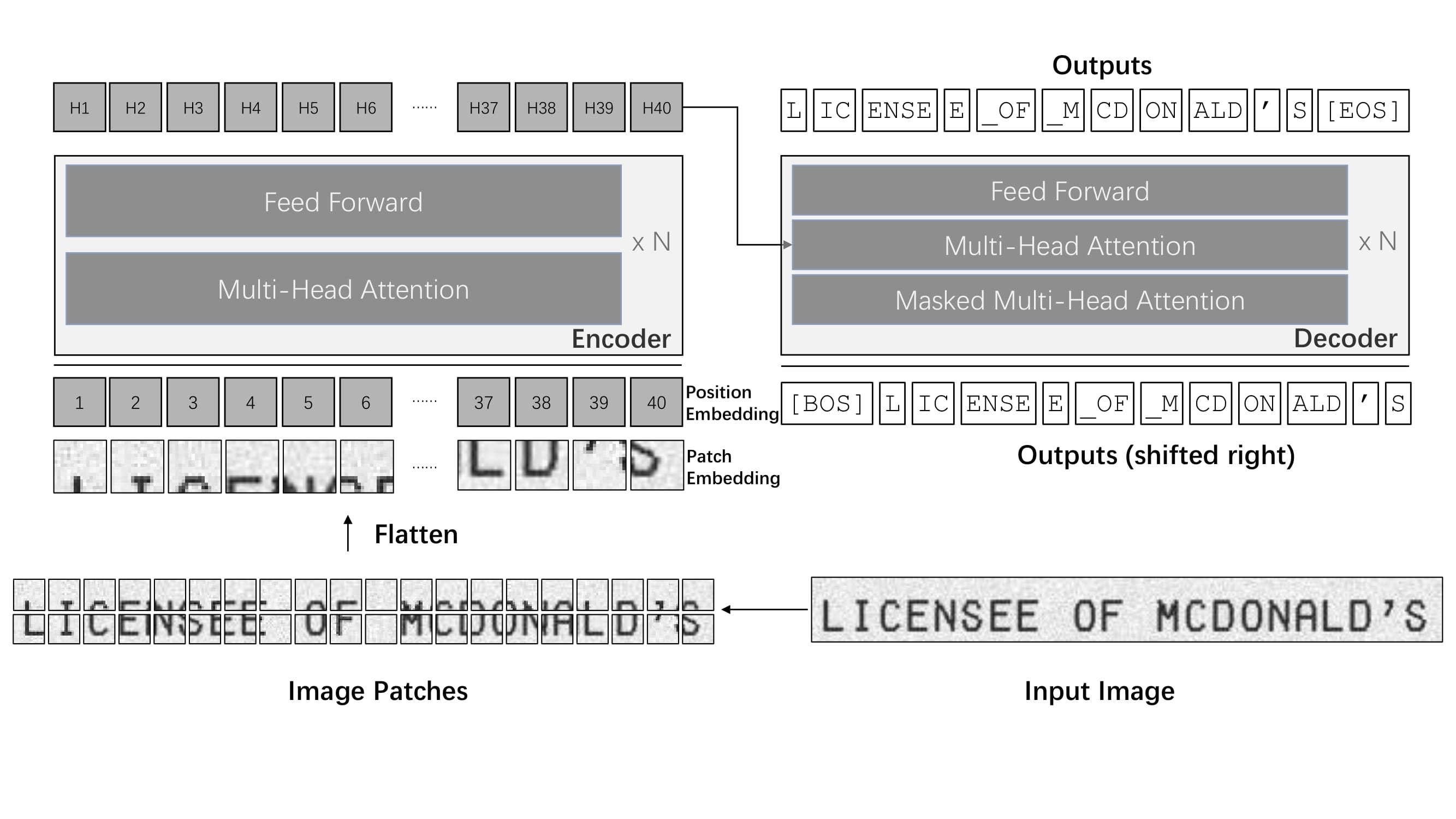 TrOCR architecture. Taken from the original paper.
Tip
This model was contributed by nielsr.
Click on the TrOCR models in the right sidebar for more examples of how to apply TrOCR to different image and text tasks.
The example below demonstrates how to perform optical character recognition (OCR) with the [AutoModel] class.
from transformers import TrOCRProcessor, VisionEncoderDecoderModel
import requests
from PIL import Image

processor = TrOCRProcessor.from_pretrained("microsoft/trocr-base-handwritten")
model = VisionEncoderDecoderModel.from_pretrained("microsoft/trocr-base-handwritten")

# load image from the IAM dataset
url = "https://fki.tic.heia-fr.ch/static/img/a01-122-02.jpg"
image = Image.open(requests.get(url, stream=True).raw).convert("RGB")

pixel_values = processor(image, return_tensors="pt").pixel_values
generated_ids = model.generate(pixel_values)

generated_text = processor.batch_decode(generated_ids, skip_special_tokens=True)[0]
print(generated_text)
Quantization
Quantization reduces the memory burden of large models by representing the weights in a lower precision. Refer to the Quantization overview for more available quantization backends.
The example below uses bitsandbytes to quantize the weights to 8-bits.
# pip install bitsandbytes accelerate
from transformers import TrOCRProcessor, VisionEncoderDecoderModel, BitsandBytesConfig
import requests
from PIL import Image

# Set up the quantization configuration
quantization_config = BitsandBytesConfig(load_in_8bit=True)

# Use a large checkpoint for a more noticeable impact
processor = TrOCRProcessor.from_pretrained("microsoft/trocr-large-handwritten")
model = VisionEncoderDecoderModel.from_pretrained(
    "microsoft/trocr-large-handwritten",
    quantization_config=quantization_config
)

# load image from the IAM dataset
url = "[https://fki.tic.heia-fr.ch/static/img/a01-122-02.jpg](https://fki.tic.heia-fr.ch/static/img/a01-122-02.jpg)"
image = Image.open(requests.get(url, stream=True).raw).convert("RGB")

pixel_values = processor(image, return_tensors="pt").pixel_values
generated_ids = model.generate(pixel_values)

generated_text = processor.batch_decode(generated_ids, skip_special_tokens=True)[0]
print(generated_text)
Notes
- TrOCR wraps [
ViTImageProcessor]/[DeiTImageProcessor] and [RobertaTokenizer]/[XLMRobertaTokenizer] into a single instance of [TrOCRProcessor] to handle images and text. - TrOCR is always used within the VisionEncoderDecoder framework.
Resources
- A blog post on Accelerating Document AI with TrOCR.
- A blog post on how to Document AI with TrOCR.
- A notebook on how to finetune TrOCR on IAM Handwriting Database using Seq2SeqTrainer.
- An interactive-demo on TrOCR handwritten character recognition.
- A notebook on inference with TrOCR and Gradio demo.
- A notebook on evaluating TrOCR on the IAM test set.
TrOCRConfig
autodoc TrOCRConfig
TrOCRProcessor
autodoc TrOCRProcessor - call - from_pretrained - save_pretrained - batch_decode - decode
TrOCRForCausalLM
autodoc TrOCRForCausalLM - forward