---
license: apache-2.0
library_name: transformers
pipeline_tag: text-generation
base_model:
- Qwen/Qwen2.5-Coder-0.5B
language:
- code
tags:
- cellsense
- fim
- fill-in-the-middle
- code-completion
- jupyter
- notebook
- code
- qwen2
model-index:
- name: cellsense-fim-0.5b
results:
- task:
type: text-generation
name: Fill-in-the-Middle Code Completion
dataset:
name: CellSense Jupyter FIM (private)
type: cellsense-fim-large
split: test
metrics:
- type: edit_similarity
value: 0.641
name: Edit Similarity
- type: bleu
value: 43.09
name: BLEU
- type: codebleu
value: 0.346
name: CodeBLEU
- type: token_accuracy
value: 0.868
name: Token Accuracy
- type: bits_per_byte
value: 0.254
name: Bits per Byte
---

# CellSense-FIM 0.5B
[](https://huggingface.co/spaces/arun11karthik/cellsense-fim)
[](https://github.com/arunkarthik11/cellsense)
[](https://pypi.org/project/jupyterlab-cellsense/)
**CellSense-FIM 0.5B** is the smallest member of the CellSense-FIM model family — a set of
**long-context, fill-in-the-middle (FIM) code-completion models built specifically for Jupyter
notebooks.** It is fine-tuned from [`Qwen/Qwen2.5-Coder-0.5B`](https://huggingface.co/Qwen/Qwen2.5-Coder-0.5B)
on the (private) **CellSense FIM** dataset and supports a **32K-token context window**.
Unlike general code models that treat a notebook as a flat file, CellSense-FIM models are trained
on a more detailed context, that actually matters when you complete a cell:
- **🗂️ Repository-aware** — the model is trained with surrounding files from the same repository in
context, so completions respect helpers, constants, and conventions defined elsewhere in the project.
- **🔗 Local-import-aware** — when your notebook imports from a sibling module, the relevant source and signatures are
pulled into context, so the model completes calls to *your* code with the right signatures, not a
plausible guess.
- **🎯 Task-aware** — the files you have been reading and editing are almost always the most relevant to
what you are working on right now. The context conditions on this context, so completions reflect where
your attention has actually been — not just what happens to be open in the active tab.
The models are best paired with the **CellSense Jupyter Lab Plugin**, which assembles repository, local-import,
and task context into the exact format the model was trained on — so the model consumes it natively with
no prompt engineering on your part.
## Model family
| Model | Base | Params | Context |
|-------|------|:------:|:-------:|
| **CellSense-FIM 0.5B** (this model) | Qwen2.5-Coder-0.5B | 0.5B | 32K |
| CellSense-FIM 1.5B | Qwen2.5-Coder-1.5B | 1.5B | 32K |
| CellSense-FIM 3B | Qwen2.5-Coder-3B | 3B | 32K |
| CellSense-FIM 7B | Qwen2.5-Coder-7B | 7B | 32K |
## Evaluation
Evaluated on the held-out `test` split of the CellSense FIM dataset. CellSense-FIM is compared against its base model
(`Qwen2.5-Coder-0.5B`) and a same-size general model (`Qwen3-0.6B`).
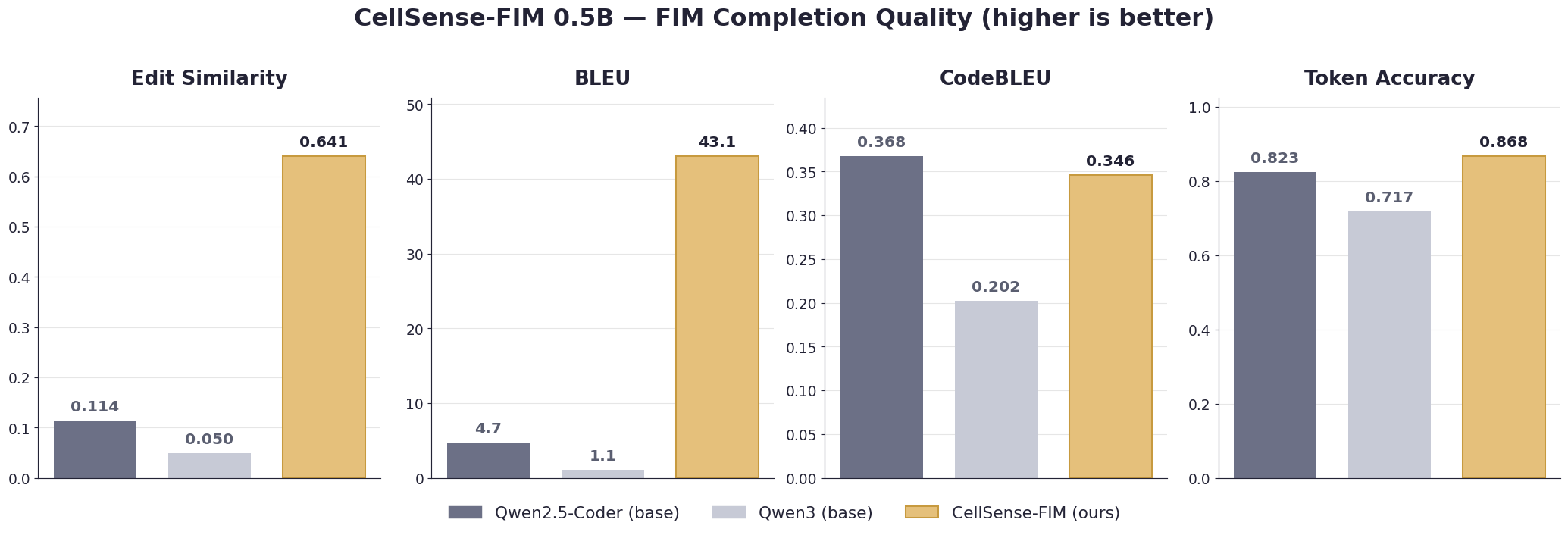
Fine-tuning on notebook-native FIM context yields large gains on the metrics that track *real completion
quality* — **edit similarity (0.11 → 0.64)** and **BLEU (4.7 → 43.1)** — while keeping token accuracy
strong. At 0.5B, CodeBLEU stays close to the base model; the larger family members improve it outright.
### Likelihood metric — Bits per Byte (lower is better)
| Model | Bits per Byte ↓ |
|-------|:---------------:|
| Qwen2.5-Coder-0.5B (base) | 0.305 |
| Qwen3-0.6B (base) | 1.082 |
| **CellSense-FIM 0.5B (ours)** | **0.254** |
## Usage
### Prompt format (FIM)
The model uses the Qwen2.5-Coder FIM sentinels. For a single-file completion:
```
<|fim_prefix|>{code before the cursor}<|fim_suffix|>{code after the cursor}<|fim_middle|>
```
For repository / local-import-aware completion, prepend the relevant files before the FIM block:
```
<|repo_name|>{repo}<|file_sep|>{path/to/helper.py}
{contents of helper.py}
<|file_sep|>{path/to/notebook_cell}
<|fim_prefix|>{prefix}<|fim_suffix|>{suffix}<|fim_middle|>
```
> 💡 In practice you don't assemble this by hand — the **CellSense JupyterLab plugin** builds the
> repository-, import-, and task-aware context and emits exactly this format (see
> [Serving with vLLM + CellSense](#serving-with-vllm--cellsense) below).
### Transformers
```python
from transformers import AutoModelForCausalLM, AutoTokenizer
model_id = "arun11karthik/cellsense-fim-0.5b"
tokenizer = AutoTokenizer.from_pretrained(model_id)
model = AutoModelForCausalLM.from_pretrained(model_id, device_map="auto")
prefix = "import pandas as pd\ndf = pd.read_csv('data.csv')\n"
suffix = "\ndf.head()\n"
prompt = f"<|fim_prefix|>{prefix}<|fim_suffix|>{suffix}<|fim_middle|>"
inputs = tokenizer(prompt, return_tensors="pt").to(model.device)
out = model.generate(**inputs, max_new_tokens=128, do_sample=False)
print(tokenizer.decode(out[0][inputs.input_ids.shape[1]:], skip_special_tokens=True))
```
## Serving with vLLM + CellSense
The intended way to use this model is to serve it with vLLM and point the
[**CellSense JupyterLab plugin**](https://github.com/arunkarthik11/CellSense) at the server over its
OpenAI-compatible API. CellSense handles all of the repository-, import-, and task-aware context
assembly and the FIM prompt formatting for you.
### 1. Serve the model with vLLM
vLLM exposes an OpenAI-compatible endpoint, which is exactly what CellSense's `openai_compatible`
provider expects:
```bash
pip install vllm
vllm serve arun11karthik/cellsense-fim-0.5b \
--served-model-name cellsense-fim-0.5b \
--max-model-len 32768 \
--port 8000
```
This serves the API at `http://localhost:8000/v1`.
### 2. Point CellSense at the vLLM server
In the CellSense settings panel (left sidebar in JupyterLab), open **Basic Settings** and configure the
**OpenAI Compatible** provider:
| Setting | Value |
|---------|-------|
| **Provider** | `OpenAI Compatible` |
| **Base URL** | `http://localhost:8000/v1` |
| **API Key** | any non-empty string (vLLM ignores it, e.g. `EMPTY`) |
| **Model** | `cellsense-fim-0.5b` (must match `--served-model-name`) |
| **Model Family** | `qwen2.5-coder` |
Click **Save & Apply**, then start typing in a notebook cell — ghost-text completions from your
local model appear inline. Press **Tab** to accept.
> 🌐 The same setup works for a **remote** vLLM server: serve the model on your GPU box, expose port
> `8000`, and set CellSense's **Base URL** to `http://:8000/v1`.
### Raw API check (optional)
To confirm the endpoint works before wiring up CellSense, query it directly with the FIM prompt:
```bash
curl http://localhost:8000/v1/completions \
-H "Content-Type: application/json" \
-d '{
"model": "cellsense-fim-0.5b",
"prompt": "<|fim_prefix|>import pandas as pd\ndf = pd.read_csv(\"data.csv\")\n<|fim_suffix|>\ndf.head()\n<|fim_middle|>",
"max_tokens": 128,
"temperature": 0.0
}'
```
## Ollama
For fully local, no-GPU-required inference, GGUF builds are published at
[**`arun11karthik/cellsense-fim-0.5b-GGUF`**](https://huggingface.co/arun11karthik/cellsense-fim-0.5b-GGUF).
Ollama can pull and run these directly from the Hugging Face Hub — no manual download or `Modelfile`
required. This is the recommended path for running CellSense entirely on your own machine: with Ollama,
**no code or context ever leaves your computer.**
### Available quantizations
| Quantization | Size (approx.) | Notes | Pull with |
|--------------|:--------------:|-------|-----------|
| `Q5_K_M` | ~420 MB | Good quality / size trade-off | `ollama run hf.co/arun11karthik/cellsense-fim-0.5b-GGUF:Q5_K_M` |
| `Q8_0` | ~531 MB | Near-lossless 8-bit quantization | `ollama run hf.co/arun11karthik/cellsense-fim-0.5b-GGUF:Q8_0` |
| `BF16` | ~994 MB | Full bfloat16 precision — highest quality (recommended) | `ollama run hf.co/arun11karthik/cellsense-fim-0.5b-GGUF:BF16` |
### 1. Install Ollama and pull the model
Install [Ollama](https://ollama.com), then pull a quantization (this also registers the model so
CellSense can use it):
```bash
ollama pull hf.co/arun11karthik/cellsense-fim-0.5b-GGUF:Q5_K_M
```
By default Ollama serves its API at `http://localhost:11434`. The model name as it appears in
`ollama list` — `hf.co/arun11karthik/cellsense-fim-0.5b-GGUF:Q5_K_M` — is what you'll enter into
CellSense below.
### 2. Install the CellSense JupyterLab plugin
```bash
pip install jupyterlab-cellsense
jupyter lab
```
See the [CellSense repository](https://github.com/arunkarthik11/CellSense) for full installation
options.
### 3. Point CellSense at your local Ollama model
Open the CellSense panel from the left sidebar in JupyterLab, go to **Basic Settings**, and configure
the **Ollama** provider:
| Setting | Value |
|---------|-------|
| **Provider** | `Ollama` |
| **Base URL** | `http://localhost:11434` |
| **Model Family** | `cellsense` |
| **Model** | `hf.co/arun11karthik/cellsense-fim-0.5b-GGUF:Q5_K_M` (must match the tag in `ollama list`) |
> ✅ **Set Model Family to `cellsense`.** CellSense now ships first-class support for the CellSense-FIM
> models, so the plugin builds prompts in exactly the repository-, import-, and task-aware FIM format
> these models were trained on — no extra configuration needed.
Click **Save & Apply**, then start typing in a notebook cell — ghost-text completions from your local
model appear inline. Press **Tab** to accept.
### Raw API check (optional)
To confirm Ollama is serving the model with the correct FIM format before wiring up CellSense, query it
directly:
```bash
curl http://localhost:11434/api/generate -d '{
"model": "hf.co/arun11karthik/cellsense-fim-0.5b-GGUF:Q5_K_M",
"prompt": "<|fim_prefix|>import pandas as pd\ndf = pd.read_csv(\"data.csv\")\n<|fim_suffix|>\ndf.head()\n<|fim_middle|>",
"stream": false,
"options": { "temperature": 0.0, "num_predict": 128 }
}'
```
## Training
- **Base model:** `Qwen/Qwen2.5-Coder-0.5B`
- **Dataset:** the private **CellSense FIM** dataset — repository-, local-import-, and task-aware FIM examples mined from Jupyter notebooks
- **Objective:** fill-in-the-middle (FIM) code completion
- **Context length:** 32,768 tokens
- **Checkpoint:** best-validation checkpoint
## Training data & privacy
CellSense-FIM was fine-tuned on a private corpus of fill-in-the-middle examples mined from Jupyter
notebooks. The dataset is **kept private as a precaution**: PII masking was applied across the corpus
and **more rigororusly verified on the sampled subset used for training**, but full masking across the entire
source corpus has only been preliminarily checked and is **not guaranteed**.
As with any model trained on scraped code, this model may reproduce content from its training data,
including any imperfectly masked sensitive strings.
If you observe any leakage, please report it via the project's issue tracker (see the GitHub link above).
## License
The finetuned weights are released under the GNU 3.0 License, whereas the base model was released under the Apache 2.0 license.
## Citation
```bibtex
@misc{cellsense-fim,
title = {CellSense-FIM: Notebook-Native Fill-in-the-Middle Code Completion},
author = {Arun Karthik},
year = {2026},
howpublished = {\url{https://huggingface.co/arun11karthik/cellsense-fim-0.5b}}
}
```