# Grounding DINO[[grounding-dino]]
## 개요[[overview]]
Grounding DINO 모델은 Shilong Liu, Zhaoyang Zeng, Tianhe Ren, Feng Li, Hao Zhang, Jie Yang, Chunyuan Li, Jianwei Yang, Hang Su, Jun Zhu, Lei Zhang이 [Grounding DINO: Marrying DINO with Grounded Pre-Training for Open-Set Object Detection](https://huggingface.co/papers/2303.05499)에서 제안한 모델입니다. Grounding DINO는 폐쇄형 객체 탐지 모델을 텍스트 인코더로 확장하여 개방형 객체 탐지를 가능하게 합니다. 이 모델은 COCO 제로샷에서 52.5 AP와 같은 놀라운 결과를 달성합니다.
논문의 초록은 다음과 같습니다:
*본 논문에서는 트랜스포머 기반 탐지기 DINO를 기반 사전 학습과 결합하여 Grounding DINO라는 개방형 객체 탐지기를 제시합니다. 이는 카테고리 이름이나 참조 표현 등의 사용자 입력으로 임의의 객체를 탐지할 수 있습니다. 개방형 객체 탐지의 핵심 해결책은 개방형 개념 일반화를 위해 폐쇄형 탐지기에 언어를 도입하는 것입니다. 언어와 비전 모달리티를 효과적으로 융합하기 위해, 폐쇄형 탐지기를 개념적으로 세 단계로 나누어 특성 강화기, 언어 기반 쿼리 선택, 교차 모달리티 융합을 위한 교차 모달리티 디코더를 포함하는 긴밀한 융합 솔루션을 제안합니다. 이전 연구들이 주로 새로운 카테고리에 대한 개방형 객체 탐지를 평가한 반면, 우리는 속성으로 지정된 객체에 대한 참조 표현 이해에 대한 평가도 수행할 것을 제안합니다. Grounding DINO는 COCO, LVIS, ODinW, RefCOCO/+/g 벤치마크를 포함한 세 가지 설정 모두에서 놀라운 성능을 보입니다. Grounding DINO는 COCO 탐지 제로샷 전이 벤치마크에서 52.5 AP(Average Precision, 평균 정밀도)를 달성했습니다. 즉, COCO의 학습 데이터 없이도 이러한 성과를 얻었습니다. 평균 26.1 AP로 ODinW 제로샷 벤치마크에서 새로운 기록을 세웠습니다.*
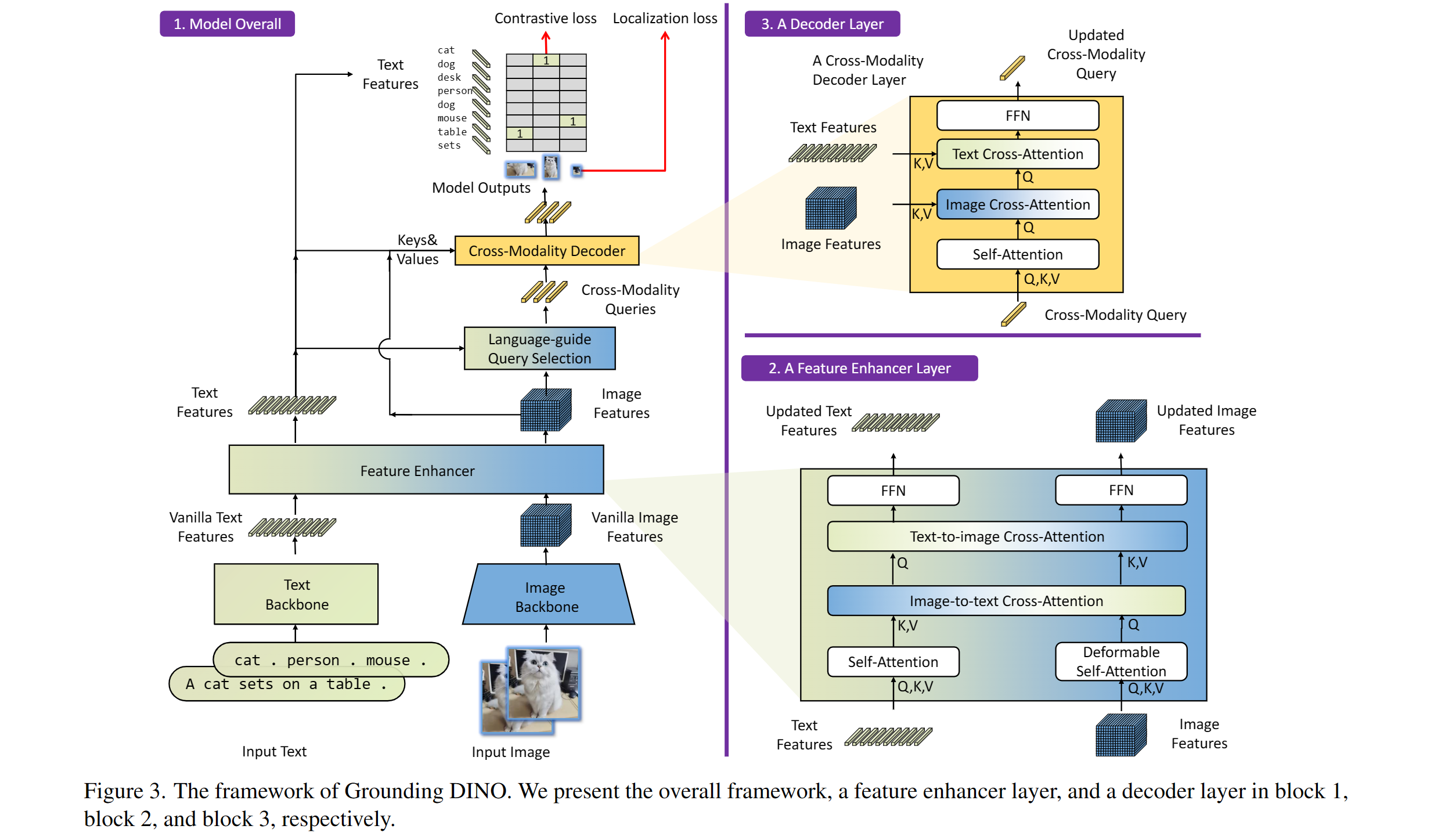 Grounding DINO 개요. 원본 논문에서 가져왔습니다.
이 모델은 [EduardoPacheco](https://huggingface.co/EduardoPacheco)와 [nielsr](https://huggingface.co/nielsr)에 의해 기여되었습니다.
원본 코드는 [여기](https://github.com/IDEA-Research/GroundingDINO)에서 찾을 수 있습니다.
## 사용 팁[[usage-tips]]
- [`GroundingDinoProcessor`]를 사용하여 모델을 위한 이미지-텍스트 쌍을 준비할 수 있습니다.
- 텍스트에서 클래스를 구분할 때는 마침표를 사용하세요. 예: "a cat. a dog."
- 여러 클래스를 사용할 때(예: `"a cat. a dog."`), [`GroundingDinoProcessor`]의 `post_process_grounded_object_detection`을 사용해 출력을 후처리해야 합니다. `post_process_object_detection`에서 반환되는 레이블은 prob > threshold인 모델 차원의 인덱스를 나타내기 때문입니다.
다음은 제로샷 객체 탐지에 모델을 사용하는 방법입니다:
```python
>>> import requests
>>> import torch
>>> from PIL import Image
>>> from transformers import AutoProcessor, AutoModelForZeroShotObjectDetection
>>> model_id = "IDEA-Research/grounding-dino-tiny"
>>> device = "cuda"
>>> processor = AutoProcessor.from_pretrained(model_id)
>>> model = AutoModelForZeroShotObjectDetection.from_pretrained(model_id).to(device)
>>> image_url = "http://images.cocodataset.org/val2017/000000039769.jpg"
>>> image = Image.open(requests.get(image_url, stream=True).raw)
>>> # 고양이와 리모컨 확인
>>> text_labels = [["a cat", "a remote control"]]
>>> inputs = processor(images=image, text=text_labels, return_tensors="pt").to(device)
>>> with torch.no_grad():
... outputs = model(**inputs)
>>> results = processor.post_process_grounded_object_detection(
... outputs,
... inputs.input_ids,
... box_threshold=0.4,
... text_threshold=0.3,
... target_sizes=[image.size[::-1]]
... )
# 첫 번째 이미지 결과 가져오기
>>> result = results[0]
>>> for box, score, labels in zip(result["boxes"], result["scores"], result["labels"]):
... box = [round(x, 2) for x in box.tolist()]
... print(f"Detected {labels} with confidence {round(score.item(), 3)} at location {box}")
Detected a cat with confidence 0.468 at location [344.78, 22.9, 637.3, 373.62]
Detected a cat with confidence 0.426 at location [11.74, 51.55, 316.51, 473.22]
```
## Grounded SAM[[grounded-sam]]
[Grounded SAM: Assembling Open-World Models for Diverse Visual Tasks](https://huggingface.co/papers/2401.14159)에서 소개된 대로 Grounding DINO를 [Segment Anything](sam) 모델과 결합하여 텍스트 기반 마스크 생성을 할 수 있습니다. 자세한 내용은 이 [데모 노트북](https://github.com/NielsRogge/Transformers-Tutorials/blob/master/Grounding%20DINO/GroundingDINO_with_Segment_Anything.ipynb) 🌍을 참조하세요.
Grounding DINO 개요. 원본 논문에서 가져왔습니다.
이 모델은 [EduardoPacheco](https://huggingface.co/EduardoPacheco)와 [nielsr](https://huggingface.co/nielsr)에 의해 기여되었습니다.
원본 코드는 [여기](https://github.com/IDEA-Research/GroundingDINO)에서 찾을 수 있습니다.
## 사용 팁[[usage-tips]]
- [`GroundingDinoProcessor`]를 사용하여 모델을 위한 이미지-텍스트 쌍을 준비할 수 있습니다.
- 텍스트에서 클래스를 구분할 때는 마침표를 사용하세요. 예: "a cat. a dog."
- 여러 클래스를 사용할 때(예: `"a cat. a dog."`), [`GroundingDinoProcessor`]의 `post_process_grounded_object_detection`을 사용해 출력을 후처리해야 합니다. `post_process_object_detection`에서 반환되는 레이블은 prob > threshold인 모델 차원의 인덱스를 나타내기 때문입니다.
다음은 제로샷 객체 탐지에 모델을 사용하는 방법입니다:
```python
>>> import requests
>>> import torch
>>> from PIL import Image
>>> from transformers import AutoProcessor, AutoModelForZeroShotObjectDetection
>>> model_id = "IDEA-Research/grounding-dino-tiny"
>>> device = "cuda"
>>> processor = AutoProcessor.from_pretrained(model_id)
>>> model = AutoModelForZeroShotObjectDetection.from_pretrained(model_id).to(device)
>>> image_url = "http://images.cocodataset.org/val2017/000000039769.jpg"
>>> image = Image.open(requests.get(image_url, stream=True).raw)
>>> # 고양이와 리모컨 확인
>>> text_labels = [["a cat", "a remote control"]]
>>> inputs = processor(images=image, text=text_labels, return_tensors="pt").to(device)
>>> with torch.no_grad():
... outputs = model(**inputs)
>>> results = processor.post_process_grounded_object_detection(
... outputs,
... inputs.input_ids,
... box_threshold=0.4,
... text_threshold=0.3,
... target_sizes=[image.size[::-1]]
... )
# 첫 번째 이미지 결과 가져오기
>>> result = results[0]
>>> for box, score, labels in zip(result["boxes"], result["scores"], result["labels"]):
... box = [round(x, 2) for x in box.tolist()]
... print(f"Detected {labels} with confidence {round(score.item(), 3)} at location {box}")
Detected a cat with confidence 0.468 at location [344.78, 22.9, 637.3, 373.62]
Detected a cat with confidence 0.426 at location [11.74, 51.55, 316.51, 473.22]
```
## Grounded SAM[[grounded-sam]]
[Grounded SAM: Assembling Open-World Models for Diverse Visual Tasks](https://huggingface.co/papers/2401.14159)에서 소개된 대로 Grounding DINO를 [Segment Anything](sam) 모델과 결합하여 텍스트 기반 마스크 생성을 할 수 있습니다. 자세한 내용은 이 [데모 노트북](https://github.com/NielsRogge/Transformers-Tutorials/blob/master/Grounding%20DINO/GroundingDINO_with_Segment_Anything.ipynb) 🌍을 참조하세요.
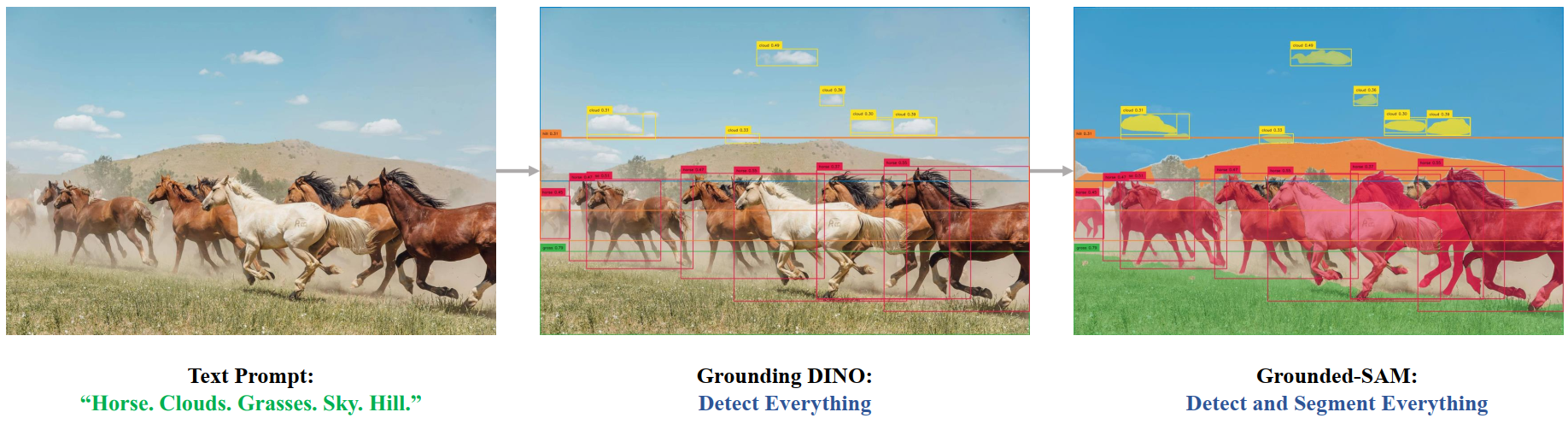 Grounded SAM 개요. 원본 저장소에서 가져왔습니다.
## 리소스[[resources]]
Grounding DINO를 시작하는 데 도움이 되는 공식 Hugging Face 및 커뮤니티(🌎로 표시) 리소스 목록입니다. 여기에 포함될 리소스를 제출하고 싶다면 Pull Request를 자유롭게 열어주세요. 검토해드리겠습니다! 리소스는 기존 리소스를 복제하는 대신 새로운 것을 보여주는 것이 이상적입니다.
- Grounding DINO로 추론하고 [SAM](sam)과 결합하는 데모 노트북은 [여기](https://github.com/NielsRogge/Transformers-Tutorials/tree/master/Grounding%20DINO)에서 찾을 수 있습니다. 🌎
## GroundingDinoImageProcessor
[[autodoc]] GroundingDinoImageProcessor
- preprocess
## GroundingDinoImageProcessorFast
[[autodoc]] GroundingDinoImageProcessorFast
- preprocess
- post_process_object_detection
## GroundingDinoProcessor
[[autodoc]] GroundingDinoProcessor
- post_process_grounded_object_detection
## GroundingDinoConfig
[[autodoc]] GroundingDinoConfig
## GroundingDinoModel
[[autodoc]] GroundingDinoModel
- forward
## GroundingDinoForObjectDetection
[[autodoc]] GroundingDinoForObjectDetection
- forward
Grounded SAM 개요. 원본 저장소에서 가져왔습니다.
## 리소스[[resources]]
Grounding DINO를 시작하는 데 도움이 되는 공식 Hugging Face 및 커뮤니티(🌎로 표시) 리소스 목록입니다. 여기에 포함될 리소스를 제출하고 싶다면 Pull Request를 자유롭게 열어주세요. 검토해드리겠습니다! 리소스는 기존 리소스를 복제하는 대신 새로운 것을 보여주는 것이 이상적입니다.
- Grounding DINO로 추론하고 [SAM](sam)과 결합하는 데모 노트북은 [여기](https://github.com/NielsRogge/Transformers-Tutorials/tree/master/Grounding%20DINO)에서 찾을 수 있습니다. 🌎
## GroundingDinoImageProcessor
[[autodoc]] GroundingDinoImageProcessor
- preprocess
## GroundingDinoImageProcessorFast
[[autodoc]] GroundingDinoImageProcessorFast
- preprocess
- post_process_object_detection
## GroundingDinoProcessor
[[autodoc]] GroundingDinoProcessor
- post_process_grounded_object_detection
## GroundingDinoConfig
[[autodoc]] GroundingDinoConfig
## GroundingDinoModel
[[autodoc]] GroundingDinoModel
- forward
## GroundingDinoForObjectDetection
[[autodoc]] GroundingDinoForObjectDetection
- forward